Grand Colosseum
Published on January 1, 2023
By rplane
👁️🗨️ 558
2267
★
★
★
★
★
Rate it
Screenshots
Description
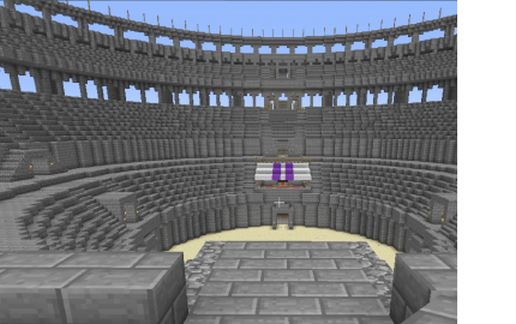
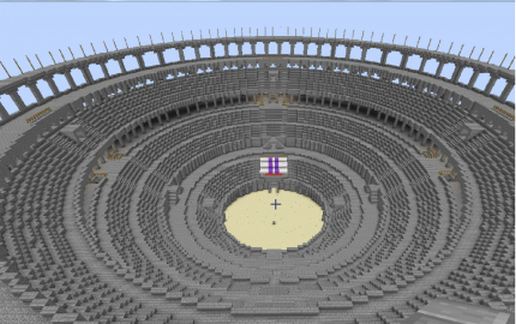
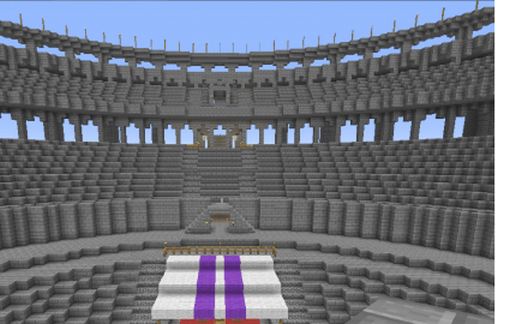
This is a huge colosseum or arena! Schematic is 170 x 170 x 88. By far the largest project I have done so far!!!
Features multiple levels, all accessible without flying by using walkways and stairs. There is enough room inside to turn inner rings into apartments, rooms or whatever else you wish. Includes full basement with labrynth (see my "foundation" schematic for pictures of lower level).
Pictures do not do it justice. Must see for yourself to appreciate the size and scope of this project. Sometimes I can't even render the whole thing when standing in some areas.
Super easy to paste, but takes a few seconds to load due to size. Simply stand where you want the exact center of the arena floor and paste. You will find yourself in the middle of a grand colosseum in a matter of seconds! If you are pasting in a superflat world you will need to be at a height of 8 or more to allow lower level to paste correctly.
This took a LOT of time and effort. If you like it please take the time to rate this one. All comments welcome, including those with improvement ideas as this may be a project I continue to build on.
If leaving a low rating, which I understand if you don't like it, have the guts to leave a comment to explain why so I can improve the quality of my schematics.
Features multiple levels, all accessible without flying by using walkways and stairs. There is enough room inside to turn inner rings into apartments, rooms or whatever else you wish. Includes full basement with labrynth (see my "foundation" schematic for pictures of lower level).
Pictures do not do it justice. Must see for yourself to appreciate the size and scope of this project. Sometimes I can't even render the whole thing when standing in some areas.
Super easy to paste, but takes a few seconds to load due to size. Simply stand where you want the exact center of the arena floor and paste. You will find yourself in the middle of a grand colosseum in a matter of seconds! If you are pasting in a superflat world you will need to be at a height of 8 or more to allow lower level to paste correctly.
This took a LOT of time and effort. If you like it please take the time to rate this one. All comments welcome, including those with improvement ideas as this may be a project I continue to build on.
If leaving a low rating, which I understand if you don't like it, have the guts to leave a comment to explain why so I can improve the quality of my schematics.
Download: Grand Colosseum schematic for Minecraft
| Format | Size | Use with | |
|---|---|---|---|
.litematic grand-colosseum.litematic |
159.18 KB | Litematica (Java) — more Litematica schematics |
|
.schem grand-colosseum.schem |
47.93 KB | WorldEdit / FAWE |
|
.schematic grand-colosseum.schematic |
69.54 KB | Legacy / online installer |
|
| Install this build directly on your Minecraft map |
|
||
Auto-converted from the original format; container contents (chests, signs) may be missing.
📘 How to use with Litematica (click to expand)
- Put the downloaded
.litematicfile into the.minecraft/schematics/folder. - In game, press M to open the Litematica menu and choose Load Schematics.
- Select the file in the list and click Load Schematic.
- Position the placement where you want it and build — or paste it instantly in creative with Easy Place mode.
Requires the Litematica mod (Java Edition).
More builds: Litematica schematics.
Comments
Similar
![Smallest Minecraft house [with all you will need :)] schematic - building](/static/images/schematics/7/2252.jpg)