Dwarf with shortsword & buckler - V2
Published on January 1, 2023
By maladur
👁️🗨️ 16
55
★
★
★
★
★
Rate it
Screenshots
Description
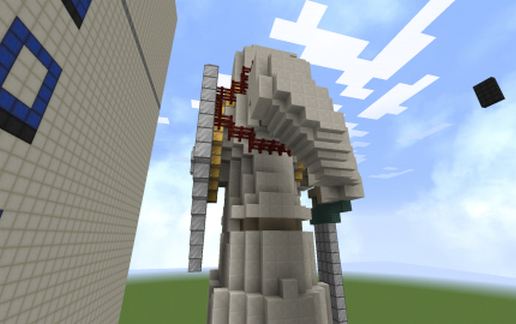
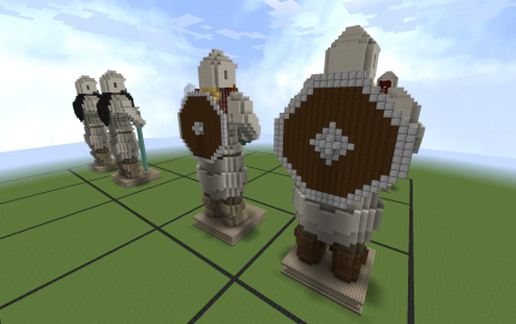
This is Version 2 of my dwarf statue with a shortsword and a buckler on the back.
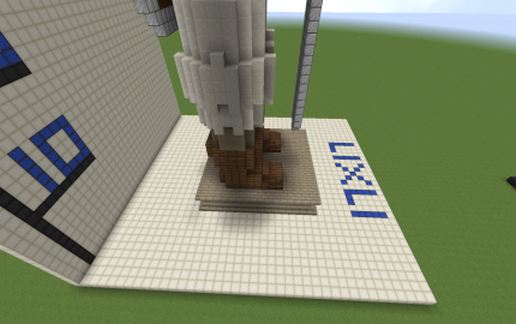
The statue is 49 blocks tall and the base is 17 x 17 block wide, but the arms are a little bit wider than the base.
The armor is made of quartz blocks, strais and slabs, the beard and the hair are made of gold blocks.
The skin is made of andesite, the boots are made of spruce wood.
The shortsword is made of iron and dark prismarine. The buckler is made of spruce wood and iron blocks. The Shield is hold on by two straps, which are made of nether brick fence.
From inside the statue is empty, exepct the arms.
If you rotate it you have to rebuild the stairs and torches (inside).
Changes to Version 1:
Now the straps go around the whole shoulder.
I have used stairs to make the statue a little more round. You can see it on the helmet and arms.
The buckler is a little bit bigger than in version 1.
The handle form the shortsword is 1 block shorter, the blade is 1 block longer.
Besides the boots are 1 block bigger and are made of spruce wood to look more like leather.
Feel free to change what u want. And I hope you will upload it too.
Some comments if u like the changes form version 1 to 2, or not would be nice.
The statue is 49 blocks tall and the base is 17 x 17 block wide, but the arms are a little bit wider than the base.
The armor is made of quartz blocks, strais and slabs, the beard and the hair are made of gold blocks.
The skin is made of andesite, the boots are made of spruce wood.
The shortsword is made of iron and dark prismarine. The buckler is made of spruce wood and iron blocks. The Shield is hold on by two straps, which are made of nether brick fence.
From inside the statue is empty, exepct the arms.
If you rotate it you have to rebuild the stairs and torches (inside).
Changes to Version 1:
Now the straps go around the whole shoulder.
I have used stairs to make the statue a little more round. You can see it on the helmet and arms.
The buckler is a little bit bigger than in version 1.
The handle form the shortsword is 1 block shorter, the blade is 1 block longer.
Besides the boots are 1 block bigger and are made of spruce wood to look more like leather.
Feel free to change what u want. And I hope you will upload it too.
Some comments if u like the changes form version 1 to 2, or not would be nice.
Download: Dwarf with shortsword & buckler - V2 schematic for Minecraft
| Format | Size | Use with | |
|---|---|---|---|
.litematic dwarf-with-shortsword-&-buckler---v2.litematic |
49.02 KB | Litematica (Java) — more Litematica schematics |
|
.schem dwarf-with-shortsword-&-buckler---v2.schem |
2.42 KB | WorldEdit / FAWE |
|
.schematic dwarf-with-shortsword-&-buckler---v2.schematic |
6.68 KB | Legacy / online installer |
|
| Install this build directly on your Minecraft map |
|
||
Auto-converted from the original format; container contents (chests, signs) may be missing.
📘 How to use with Litematica (click to expand)
- Put the downloaded
.litematicfile into the.minecraft/schematics/folder. - In game, press M to open the Litematica menu and choose Load Schematics.
- Select the file in the list and click Load Schematic.
- Position the placement where you want it and build — or paste it instantly in creative with Easy Place mode.
Requires the Litematica mod (Java Edition).
More builds: Litematica schematics.
Comments
Similar