Dome House (Furnished)
Published on January 1, 2023
By stevenb
👁️🗨️ 153
45
★
★
★
★
★
Rate it
Screenshots
Description
Greetings Fellow Crafters
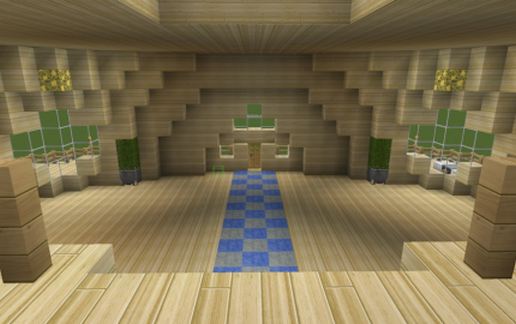
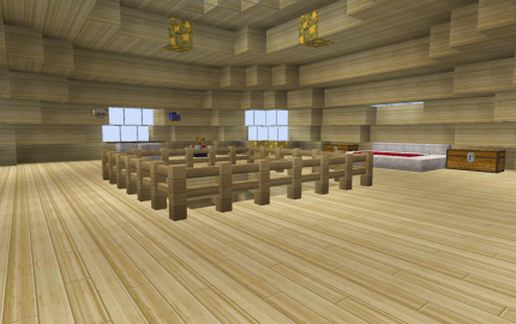
Something I have been working on. Im trying to replicate domed houses in Minecraft. This is my first attempt.
They exist in real life. I saw one when I was a kid. Loved it from that day on.
Always wanted to buy a domed home kit and build one. This is kind of what I would go for I think.
I crafted this in Minecraft 1.7.10 so its compatible with 1.7.10 and up. Used generic blocks for most of it. Its copied and schemed at ground level y=4 on a flatmap. So all you need do is paste it anywhere you want it to go. I expanded the region 30 up from y=4 so it will take up alittle top space, but not much.
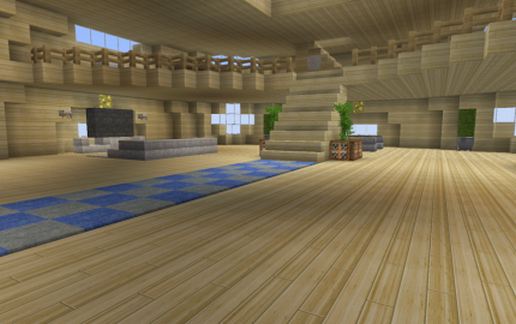
its a 3 story home. Bedroom on the 3rd floor, 2rd floor is a recreation area and the first is living room, dining room and kitchen. I furnished it up abit using ideas I have seen in other creations from you guys. Well, did the best I could anyways.
IT also has a garage. I use malisisdoors mod in my server. So when I decorate it it I will probably add a roll up garage door. Along with MrCrayFish's furniture mod as well. Gonna be fun stuff hehe!
Its made of mostly birch. I love the shade of birch wood. Pretty. I use RealCW for my texture pack though.
Hope you enjoy it as much as I enjoyed making it.
any questions? shoot me a email at
[email protected]
-MrCutandPaste
PS if you could throw me a comment or vote to let me know how im doing?. Would greatly appreciate it.
Thanks
Something I have been working on. Im trying to replicate domed houses in Minecraft. This is my first attempt.
They exist in real life. I saw one when I was a kid. Loved it from that day on.
Always wanted to buy a domed home kit and build one. This is kind of what I would go for I think.
I crafted this in Minecraft 1.7.10 so its compatible with 1.7.10 and up. Used generic blocks for most of it. Its copied and schemed at ground level y=4 on a flatmap. So all you need do is paste it anywhere you want it to go. I expanded the region 30 up from y=4 so it will take up alittle top space, but not much.
its a 3 story home. Bedroom on the 3rd floor, 2rd floor is a recreation area and the first is living room, dining room and kitchen. I furnished it up abit using ideas I have seen in other creations from you guys. Well, did the best I could anyways.
IT also has a garage. I use malisisdoors mod in my server. So when I decorate it it I will probably add a roll up garage door. Along with MrCrayFish's furniture mod as well. Gonna be fun stuff hehe!
Its made of mostly birch. I love the shade of birch wood. Pretty. I use RealCW for my texture pack though.
Hope you enjoy it as much as I enjoyed making it.
any questions? shoot me a email at
[email protected]
-MrCutandPaste
PS if you could throw me a comment or vote to let me know how im doing?. Would greatly appreciate it.
Thanks
Download: Dome House (Furnished) schematic for Minecraft
| Format | Size | Use with | |
|---|---|---|---|
.litematic dome-house-(furnished).litematic |
57.79 KB | Litematica (Java) — more Litematica schematics |
|
.schem dome-house-(furnished).schem |
3.85 KB | WorldEdit / FAWE |
|
.schematic dome-house-(furnished).schematic |
8.33 KB | Legacy / online installer |
|
| Install this build directly on your Minecraft map |
|
||
Auto-converted from the original format; container contents (chests, signs) may be missing.
📘 How to use with Litematica (click to expand)
- Put the downloaded
.litematicfile into the.minecraft/schematics/folder. - In game, press M to open the Litematica menu and choose Load Schematics.
- Select the file in the list and click Load Schematic.
- Position the placement where you want it and build — or paste it instantly in creative with Easy Place mode.
Requires the Litematica mod (Java Edition).
More builds: Litematica schematics.
Comments
Similar