Dryad Sanctuary
Published on January 1, 2023
By EdCr0w
👁️🗨️ 170
31
★
★
★
★
★
Rate it
Description
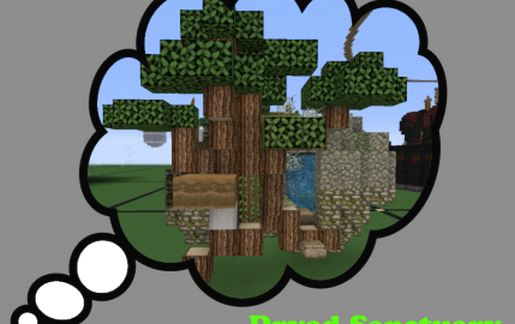
Just Walking around finding a nice lil pond. You Know what would look nice there. A Couple broken boulders with a tree growing between them. Shazbot! So mote it be. As well as some additional magic like walls that dispense coal and iron ore. On/Off water fall covers a secret back door. A little nook holds a sleeping room with furnace and crafting table.
It's MaAagic! Pick out the packing wool and refilled the water bucket after installation.
It's MaAagic! Pick out the packing wool and refilled the water bucket after installation.
Download: Dryad Sanctuary schematic for Minecraft
| Format | Size | Use with | |
|---|---|---|---|
.litematic dryad-sanctuary.litematic |
51.28 KB | Litematica (Java) — more Litematica schematics |
|
.schem dryad-sanctuary.schem |
1.48 KB | WorldEdit / FAWE |
|
.schematic dryad-sanctuary.schematic |
1.84 KB | Legacy / online installer |
|
| Install this build directly on your Minecraft map |
|
||
Auto-converted from the original format; container contents (chests, signs) may be missing.
📘 How to use with Litematica (click to expand)
- Put the downloaded
.litematicfile into the.minecraft/schematics/folder. - In game, press M to open the Litematica menu and choose Load Schematics.
- Select the file in the list and click Load Schematic.
- Position the placement where you want it and build — or paste it instantly in creative with Easy Place mode.
Requires the Litematica mod (Java Edition).
More builds: Litematica schematics.
Comments
Similar