Elykdez's Timbercutter (Semi-Auto Tree Farm)
Published on January 1, 2023
By Elykdez
👁️🗨️ 192
87
★
★
★
★
★
Rate it
Screenshots
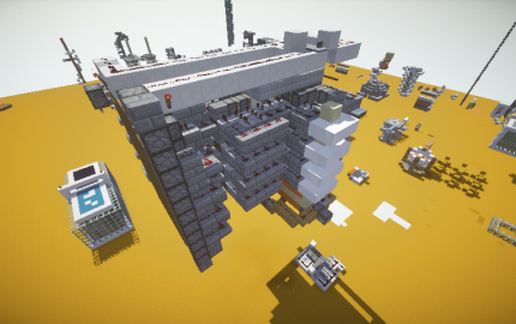
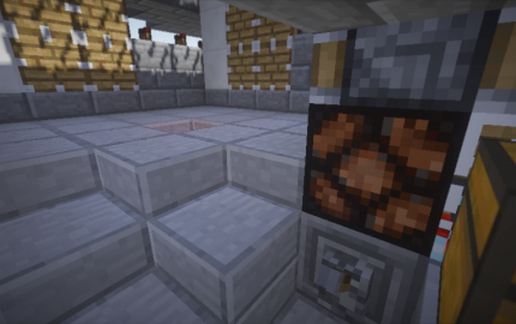
Description
(THIS CREATION NO LONGER WORKS AFTER 1.10)
Updated version (1.14+): https://www.minecraft-schematics.com/schematic/13810/
Inspired by the Cubehamster(Youtube)'s tree farm with different pushing mechanism; Also thanks to TT lemon(Youtube) for his pulse extender idea.
Pros:
- Tree goes in, wood comes out.
- 100% efficiency of leaves recycling.
- Works with all types of trees without branches.
- Compact.
- Easy-repairable.
- Non-directional design.
Cons:
- A bit slow without automatic sapling collection.
- It uses hoppers and droppers, which means it may not work on bukkit servers.
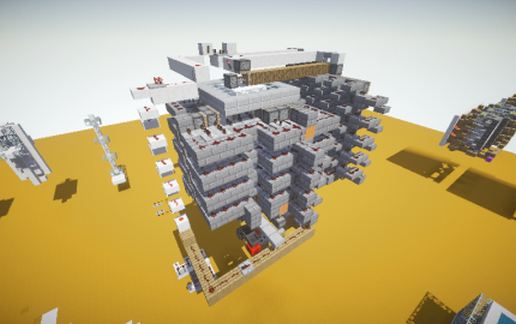
The schematic I've post here has only the core mechanism without decoration, If you guys prefer the one I've built in my survival world, please tell me so I would update it.
To use this farm in game, simply walk into the entrance, plant a tree, bone-meal it, flip the lever and wait for the leaf crusher finishing its job. After the sand column goes down, flip the lever, the light above indicates the machine is ready to be used again. The entire process takes about 10 secs. You may collect saplings inside and woods outside the machine after all work is done.
Be sure NOT to paste it without air blocks if you don't know how to fix it, because some mechanisms wont work, such as pistons, if the air nearby is occupied.
~ Thanks to Sphax BDcraft textures and KUDA shaders for the screenshots.
~ If you wanna post this schematic anywhere else, please give a credit link here in description.
~ Thank you for supporting this contraption and enjoy using it in your own game!
Updated version (1.14+): https://www.minecraft-schematics.com/schematic/13810/
Inspired by the Cubehamster(Youtube)'s tree farm with different pushing mechanism; Also thanks to TT lemon(Youtube) for his pulse extender idea.
Pros:
- Tree goes in, wood comes out.
- 100% efficiency of leaves recycling.
- Works with all types of trees without branches.
- Compact.
- Easy-repairable.
- Non-directional design.
Cons:
- A bit slow without automatic sapling collection.
- It uses hoppers and droppers, which means it may not work on bukkit servers.
The schematic I've post here has only the core mechanism without decoration, If you guys prefer the one I've built in my survival world, please tell me so I would update it.
To use this farm in game, simply walk into the entrance, plant a tree, bone-meal it, flip the lever and wait for the leaf crusher finishing its job. After the sand column goes down, flip the lever, the light above indicates the machine is ready to be used again. The entire process takes about 10 secs. You may collect saplings inside and woods outside the machine after all work is done.
Be sure NOT to paste it without air blocks if you don't know how to fix it, because some mechanisms wont work, such as pistons, if the air nearby is occupied.
~ Thanks to Sphax BDcraft textures and KUDA shaders for the screenshots.
~ If you wanna post this schematic anywhere else, please give a credit link here in description.
~ Thank you for supporting this contraption and enjoy using it in your own game!
Download: Elykdez's Timbercutter (Semi-Auto Tree Farm) schematic for Minecraft
| Format | Size | Use with | |
|---|---|---|---|
.litematic elykdez's-timbercutter-(semi-auto-tree-farm).litematic |
45.12 KB | Litematica (Java) — more Litematica schematics |
|
.schem elykdez's-timbercutter-(semi-auto-tree-farm).schem |
2.04 KB | WorldEdit / FAWE |
|
.schematic elykdez's-timbercutter-(semi-auto-tree-farm).schematic |
1.61 KB | Legacy / online installer |
|
| Install this build directly on your Minecraft map |
|
||
Auto-converted from the original format; container contents (chests, signs) may be missing.
📘 How to use with Litematica (click to expand)
- Put the downloaded
.litematicfile into the.minecraft/schematics/folder. - In game, press M to open the Litematica menu and choose Load Schematics.
- Select the file in the list and click Load Schematic.
- Position the placement where you want it and build — or paste it instantly in creative with Easy Place mode.
Requires the Litematica mod (Java Edition).
More builds: Litematica schematics.
Comments
Similar