Stargate Ring Transporter
Published on January 1, 2023
By Mafoo
👁️🗨️ 162
38
★
★
★
★
★
Rate it
Screenshots
Description
Here we go here is my first creation
Designed in 1.7.2
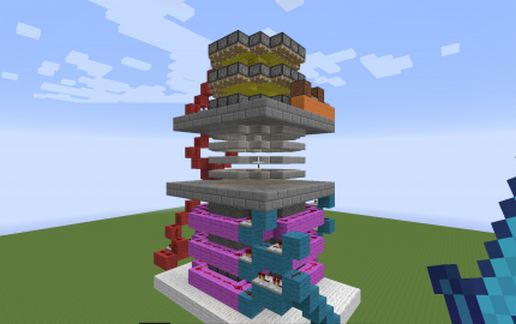
A teleporter inspired by the Stargate ring transporters (http://www.stargate-sg1-solutions.com/wiki/Ring_Transporter
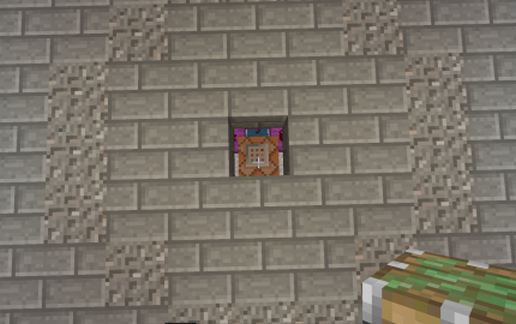
There is a command block just underneath the centre of the transport platform that does the TP, it currently moves you +5 X to demonstrate it working, I would recommend only changing the destination, as the selector is set-up just to teleport people inside the ring.
Sequence currently
- bring the ring down from above
- plays a tune (whoever ID's it first gets a mention!)
- issue the tp command
- run the reset cycle to push the rings back up
Customization
You can replace the rings with any slab (remember to place upside down, I would recommend you place a switch on the very top red block in the on position to force the rings down)
Change the walking plate out to be sand (just remember to install some supports) to make it not obvious where the ring is
you can slab the ceiling to also hide the protruding slabs
Whislist
I couldn't figure out how to program a command block to scan a specific area relative to placement to be a invisible trigger. ( I know how to read specific X Y Z which won't help people who want a easy set-up). If you know how to do this please do let me know how!
If you need some help getting this working on your server give me a shout and i will see what i can do.
Designed in 1.7.2
A teleporter inspired by the Stargate ring transporters (http://www.stargate-sg1-solutions.com/wiki/Ring_Transporter
There is a command block just underneath the centre of the transport platform that does the TP, it currently moves you +5 X to demonstrate it working, I would recommend only changing the destination, as the selector is set-up just to teleport people inside the ring.
Sequence currently
- bring the ring down from above
- plays a tune (whoever ID's it first gets a mention!)
- issue the tp command
- run the reset cycle to push the rings back up
Customization
You can replace the rings with any slab (remember to place upside down, I would recommend you place a switch on the very top red block in the on position to force the rings down)
Change the walking plate out to be sand (just remember to install some supports) to make it not obvious where the ring is
you can slab the ceiling to also hide the protruding slabs
Whislist
I couldn't figure out how to program a command block to scan a specific area relative to placement to be a invisible trigger. ( I know how to read specific X Y Z which won't help people who want a easy set-up). If you know how to do this please do let me know how!
If you need some help getting this working on your server give me a shout and i will see what i can do.
Download: Stargate Ring Transporter schematic for Minecraft
| Format | Size | Use with | |
|---|---|---|---|
.litematic stargate-ring-transporter.litematic |
40.80 KB | Litematica (Java) — more Litematica schematics |
|
.schem stargate-ring-transporter.schem |
1.14 KB | WorldEdit / FAWE |
|
.schematic stargate-ring-transporter.schematic |
1.22 KB | Legacy / online installer |
|
| Install this build directly on your Minecraft map |
|
||
Auto-converted from the original format; container contents (chests, signs) may be missing.
📘 How to use with Litematica (click to expand)
- Put the downloaded
.litematicfile into the.minecraft/schematics/folder. - In game, press M to open the Litematica menu and choose Load Schematics.
- Select the file in the list and click Load Schematic.
- Position the placement where you want it and build — or paste it instantly in creative with Easy Place mode.
Requires the Litematica mod (Java Edition).
More builds: Litematica schematics.
Comments
Similar