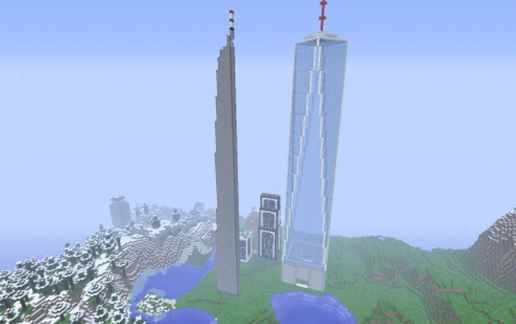
One World Trade Center
Published on January 1, 2023
By canadiangaming404
👁️🗨️ 229
167
★
★
★
★
★
Rate it
Description
The One World Trade Center or Freedom Tower in New York City
Download: One World Trade Center schematic for Minecraft
| Format | Size | Use with | |
|---|---|---|---|
.litematic one-world-trade-center.litematic |
39.70 KB | Litematica (Java) — more Litematica schematics |
|
.schem one-world-trade-center.schem |
2.06 KB | WorldEdit / FAWE |
|
.schematic one-world-trade-center.schematic |
2.44 KB | Legacy / online installer |
|
| Install this build directly on your Minecraft map |
|
||
Auto-converted from the original format; container contents (chests, signs) may be missing.
📘 How to use with Litematica (click to expand)
- Put the downloaded
.litematicfile into the.minecraft/schematics/folder. - In game, press M to open the Litematica menu and choose Load Schematics.
- Select the file in the list and click Load Schematic.
- Position the placement where you want it and build — or paste it instantly in creative with Easy Place mode.
Requires the Litematica mod (Java Edition).
More builds: Litematica schematics.
Comments
Similar







so i know this is a memorial and my teacher talked about it in class so im not trying to joke about it. but i always wondered what would be there if they built something else instead. my idea is a giant free arcade with like 5 floors of games and a pizza floor where its all free for kids, and on the roof a roller coaster that goes around the whole block. my friend said a trampoline park but i said that feels wrong for a sad place so we dropped that one. my other idea is a huge greenhouse with trees and birds inside and a fountain in the middle where u can sit when its raining. and the top floor should be a quiet room with the names and photos so people can remember. honestly the new tower looks so cool with the glass and the way it gets narrower at the top, i just think it needs a water slide on the side for the summer lol. the teachers would hate that but every kid in the city would be there every single day