Sinking Ship by LecoRubb
Published on January 1, 2023
By Chunkie
👁️🗨️ 206
113
★
★
★
★
★
Rate it
Screenshots
Description
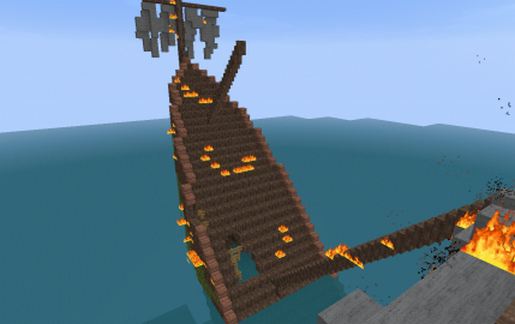
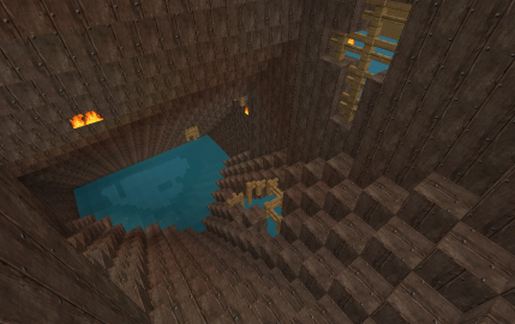
A sinking ship with fire on it. The half of it is under the water so place it anywhere where the water won't make any probs:]
~Link4Chunk~
*EDIT* Before pasting this schematic into your world make sure your gamerule doFireTick is set to false otherwise the ship will burn down in flames. To change the gamerule just write in the chat -> /gamerule doFireTick false as an operator.
~Link4Chunk~
*EDIT* Before pasting this schematic into your world make sure your gamerule doFireTick is set to false otherwise the ship will burn down in flames. To change the gamerule just write in the chat -> /gamerule doFireTick false as an operator.
Download: Sinking Ship by LecoRubb schematic for Minecraft
| Format | Size | Use with | |
|---|---|---|---|
.litematic sinking-ship-by-lecorubb.litematic |
37.35 KB | Litematica (Java) — more Litematica schematics |
|
.schem sinking-ship-by-lecorubb.schem |
2.60 KB | WorldEdit / FAWE |
|
.schematic sinking-ship-by-lecorubb.schematic |
4.51 KB | Legacy / online installer |
|
| Install this build directly on your Minecraft map |
|
||
Auto-converted from the original format; container contents (chests, signs) may be missing.
📘 How to use with Litematica (click to expand)
- Put the downloaded
.litematicfile into the.minecraft/schematics/folder. - In game, press M to open the Litematica menu and choose Load Schematics.
- Select the file in the list and click Load Schematic.
- Position the placement where you want it and build — or paste it instantly in creative with Easy Place mode.
Requires the Litematica mod (Java Edition).
More builds: Litematica schematics.
Comments
Similar