Vufflens Castle
Published on March 31, 2026
👁️🗨️ 3042
280
★
★
★
★
★
Rate it
Description
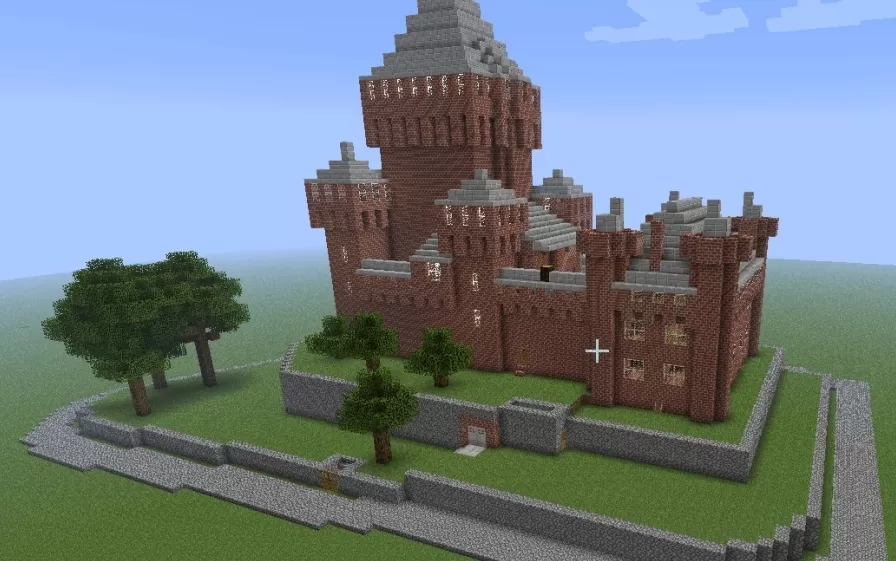
This schematic recreates Vufflens Castle, a late-medieval fortress from Switzerland originally constructed in 1425, replicated with historical accuracy down to its architectural details and proportions. The castle features distinctive red brick construction with stone accents, dominated by a massive square keep tower with stepped battlements and gray stone crenellations. The fortress complex includes multiple defensive towers of varying heights connected by curtain walls, all built with authentic medieval brickwork patterns that match the original structure's materials. The build sits within a stone perimeter wall that encloses a landscaped courtyard complete with decorative trees and pathways.
The replica maintains historical fidelity to the original castle's layout, which means some interior room arrangements may appear unconventional by modern standards but accurately reflect 15th-century Swiss defensive architecture. The brick construction with stone detailing creates an authentic medieval aesthetic, while the prominent central keep provides a commanding presence befitting a noble residence and fortification. This schematic works perfectly for historical recreation worlds, medieval server builds, or educational projects focused on authentic European castle architecture. The compact yet imposing design makes it suitable for survival builds where players want a genuine medieval fortress rather than fantasy interpretations, and the multiple towers offer varied interior spaces for living quarters, storage, and defensive positions.
The replica maintains historical fidelity to the original castle's layout, which means some interior room arrangements may appear unconventional by modern standards but accurately reflect 15th-century Swiss defensive architecture. The brick construction with stone detailing creates an authentic medieval aesthetic, while the prominent central keep provides a commanding presence befitting a noble residence and fortification. This schematic works perfectly for historical recreation worlds, medieval server builds, or educational projects focused on authentic European castle architecture. The compact yet imposing design makes it suitable for survival builds where players want a genuine medieval fortress rather than fantasy interpretations, and the multiple towers offer varied interior spaces for living quarters, storage, and defensive positions.
Download: Vufflens Castle schematic for Minecraft
| Format | Size | Use with | |
|---|---|---|---|
.litematic vufflens-castle.litematic |
55.76 KB | Litematica (Java) — more Litematica schematics |
|
.schem vufflens-castle.schem |
7.70 KB | WorldEdit / FAWE |
|
.schematic vufflens-castle.schematic |
574.38 KB | Legacy / online installer |
|
| Install this build directly on your Minecraft map |
|
||
Auto-converted from the original format; container contents (chests, signs) may be missing.
📘 How to use with Litematica (click to expand)
- Put the downloaded
.litematicfile into the.minecraft/schematics/folder. - In game, press M to open the Litematica menu and choose Load Schematics.
- Select the file in the list and click Load Schematic.
- Position the placement where you want it and build — or paste it instantly in creative with Easy Place mode.
Requires the Litematica mod (Java Edition).
More builds: Litematica schematics.
Comments
Similar