The Sky City of Athalux
Published on January 1, 2023
By EternalDawn
👁️🗨️ 493
5363
★
★
★
★
★
Rate it
Screenshots
Description
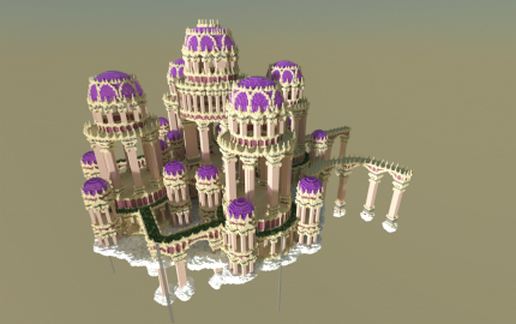
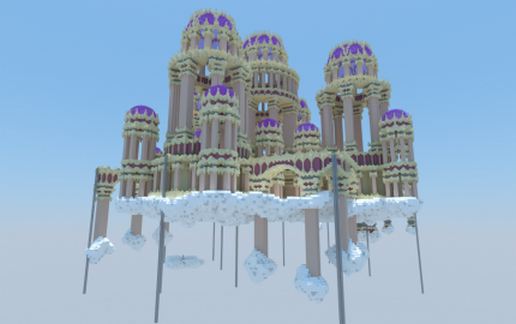
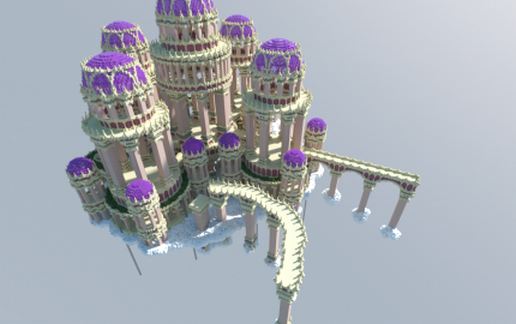
This is the first flying structure/ world we have created. The map could ideally be used for the use of an server spawn or hub. In the middle of the build you can an big hall. Which contains 8 ways into 4 identical towers. In this zones portals could be placed. We hope you enjoy our content :)
You are allowed to use this map. But NEVER claim it as yours, you always have to give us ` EternalDawn` full credit for the build.
--------------------------------------------------------------------------------------------
This build includes:
- An flying Island
- Palace building
- 4 identical towers
--------------------------------------------------------------------------------------------
Storyline of The Sky City of Athalux :
Built during 25 years, this palace is built here to celebrate the safety and serenity of this region, which has been the standard for so long.
Its position within this community is meant to represent the creative spirit of this community and how it affected and continues to affect life.
Every element was crafted and created with special materials, ensuring this monument will stand the tests of time and be part of the community for ages.
You are allowed to use this map. But NEVER claim it as yours, you always have to give us ` EternalDawn` full credit for the build.
--------------------------------------------------------------------------------------------
This build includes:
- An flying Island
- Palace building
- 4 identical towers
--------------------------------------------------------------------------------------------
Storyline of The Sky City of Athalux :
Built during 25 years, this palace is built here to celebrate the safety and serenity of this region, which has been the standard for so long.
Its position within this community is meant to represent the creative spirit of this community and how it affected and continues to affect life.
Every element was crafted and created with special materials, ensuring this monument will stand the tests of time and be part of the community for ages.
Download: The Sky City of Athalux schematic for Minecraft
| Format | Size | Use with | |
|---|---|---|---|
.litematic the-sky-city-of-athalux.litematic |
317.90 KB | Litematica (Java) — more Litematica schematics |
|
.schem the-sky-city-of-athalux.schem |
227.02 KB | WorldEdit / FAWE |
|
.schematic the-sky-city-of-athalux.schematic |
299.43 KB | Legacy / online installer Older format: about 10% of the blocks are replaced with their closest pre-1.13 lookalikes. |
|
| Install this build directly on your Minecraft map |
|
||
Auto-converted from the original format; container contents (chests, signs) may be missing.
📘 How to use with Litematica (click to expand)
- Put the downloaded
.litematicfile into the.minecraft/schematics/folder. - In game, press M to open the Litematica menu and choose Load Schematics.
- Select the file in the list and click Load Schematic.
- Position the placement where you want it and build — or paste it instantly in creative with Easy Place mode.
Requires the Litematica mod (Java Edition).
More builds: Litematica schematics.
Comments
Similar