Hidden Down Stairway
Published on January 1, 2023
By CleanerOrc
👁️🗨️ 189
54
★
★
★
★
★
Rate it
Description
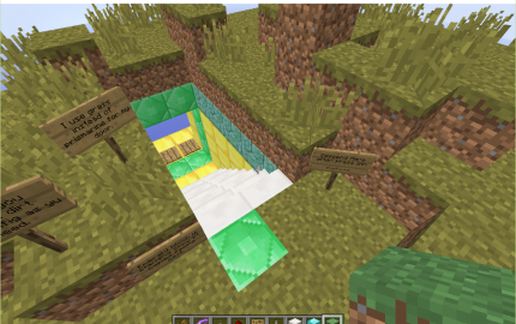
A horizontal 2x5 block door covers a hidden down stairway. When activated, the door blocks slide apart and the top step raises to form a stairway from ground level down. Can be used to hide an entrance to a dungeon or evil lab or treasure vault! Schematic includes a top level open button, and pressure plates at the bottom of the stairs to open from below.
Copied while standing on Emerald block in front of door facing East. I changed the door panels to prismarine in the schematic so it's easier to see the panels when integrating it.
A delay circuit closes the door after ~15 seconds. Includes an AND gate lockout so switch inputs can't try to open the door if it's already open (so won't confuse circuit). Very Stable.
The Delayed Deactivation circuit alone is available laid out flat in http://www.minecraft-schematics.com/schematic/11110/.
I copied this schematic out of a hidden door in a field so kept some of the grass, etc, as an implementation idea. The delay circuit sprawls horizontally, but could probably be moved below the door for a narrower but higher cuboid space. Probably needs some cleanup before final paste.
Enjoy!
Original Door/Stairs design by Nims (NimsTV on YouTube) "Minecraft Tutorial | Sliding Underground Base v3.0" https://youtu.be/JTdmrYgEITY?list=PLL8R1gMO8fLG9_2mixkO1aGCQNvtRZMRT. It does not include the close door delay circuit, but gives a great tutorial on building the door.
I think you could build a vertical door to an up stairway, but it would take some work to hide the door mechanism and other circuitry.
Copied while standing on Emerald block in front of door facing East. I changed the door panels to prismarine in the schematic so it's easier to see the panels when integrating it.
A delay circuit closes the door after ~15 seconds. Includes an AND gate lockout so switch inputs can't try to open the door if it's already open (so won't confuse circuit). Very Stable.
The Delayed Deactivation circuit alone is available laid out flat in http://www.minecraft-schematics.com/schematic/11110/.
I copied this schematic out of a hidden door in a field so kept some of the grass, etc, as an implementation idea. The delay circuit sprawls horizontally, but could probably be moved below the door for a narrower but higher cuboid space. Probably needs some cleanup before final paste.
Enjoy!
Original Door/Stairs design by Nims (NimsTV on YouTube) "Minecraft Tutorial | Sliding Underground Base v3.0" https://youtu.be/JTdmrYgEITY?list=PLL8R1gMO8fLG9_2mixkO1aGCQNvtRZMRT. It does not include the close door delay circuit, but gives a great tutorial on building the door.
I think you could build a vertical door to an up stairway, but it would take some work to hide the door mechanism and other circuitry.
Download: Hidden Down Stairway schematic for Minecraft
| Format | Size | Use with | |
|---|---|---|---|
.litematic hidden-down-stairway.litematic |
60.50 KB | Litematica (Java) — more Litematica schematics |
|
.schem hidden-down-stairway.schem |
2.21 KB | WorldEdit / FAWE |
|
.schematic hidden-down-stairway.schematic |
3.90 KB | Legacy / online installer |
|
| Install this build directly on your Minecraft map |
|
||
Auto-converted from the original format; container contents (chests, signs) may be missing.
📘 How to use with Litematica (click to expand)
- Put the downloaded
.litematicfile into the.minecraft/schematics/folder. - In game, press M to open the Litematica menu and choose Load Schematics.
- Select the file in the list and click Load Schematic.
- Position the placement where you want it and build — or paste it instantly in creative with Easy Place mode.
Requires the Litematica mod (Java Edition).
More builds: Litematica schematics.
Comments
Similar